> For the complete documentation index, see [llms.txt](https://academy.gopersonal.ai/llms.txt). Markdown versions of documentation pages are available by appending `.md` to page URLs; this page is available as [Markdown](https://academy.gopersonal.ai/guia-de-usuario/recomendaciones/estrategias-custom/promocionar-items-manualmente.md).
# Promocionar Items manualmente
Esta estrategia permite destacar productos específicos al seleccionarlos manualmente para su inclusión en el carrusel de recomendaciones.
Esta estrategia es ideal para resaltar productos de interés, ofertas especiales o nuevos lanzamientos, asegurando que los ítems elegidos obtengan la visibilidad deseada. La capacidad de seleccionar manualmente los productos ofrece un control preciso sobre qué artículos se destacan en las recomendaciones, optimizando así las oportunidades de conversión.
Para crear una estrategia custom de este tipo basta con ingresar el nombre de la misma, y seleccionar el tipo promocionar items manualmente.
## Seleccionar Items
Buscar y elegir productos por nombre o SKU para agregarlos al listado.
{% hint style="info" %}
Los items se muestran en el mismo orden del listado. Es posible ordenarlos utilizando la funcionalidad drag & drop.
{% endhint %}
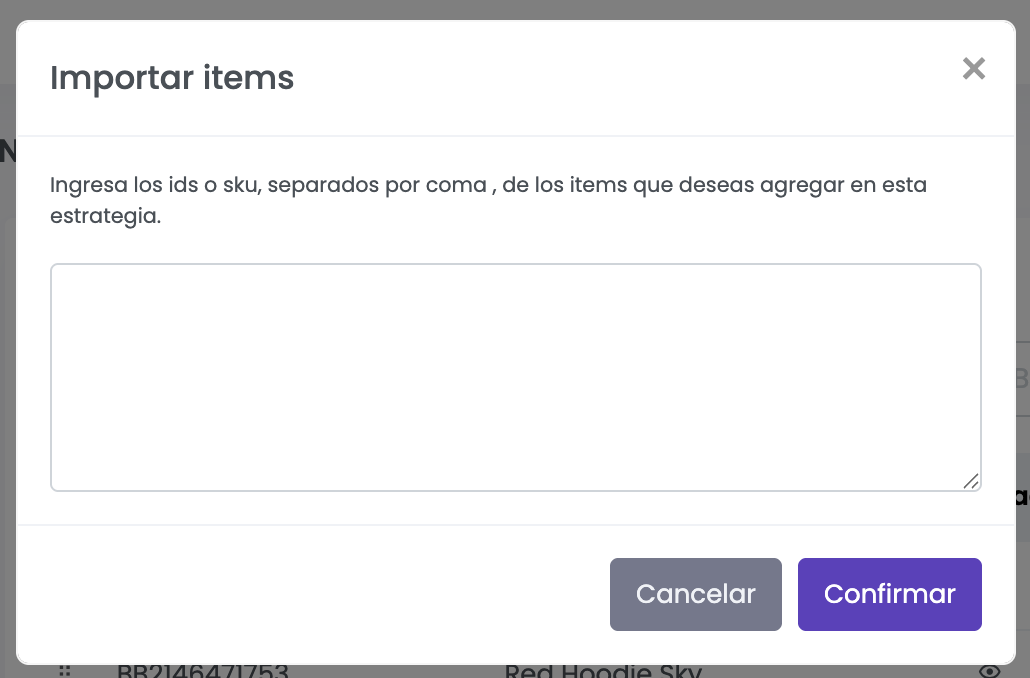
También es posible importar los ítems de forma masiva presionando el botón e ingresando los identificadores (IDs o SKUs) separados por comas (`,`). Esta funcionalidad agiliza la carga de productos cuando se desea trabajar con grandes volúmenes o listas previamente definidas.


 e ingresando los identificadores (IDs o SKUs) separados por comas (`,`). Esta funcionalidad agiliza la carga de productos cuando se desea trabajar con grandes volúmenes o listas previamente definidas.